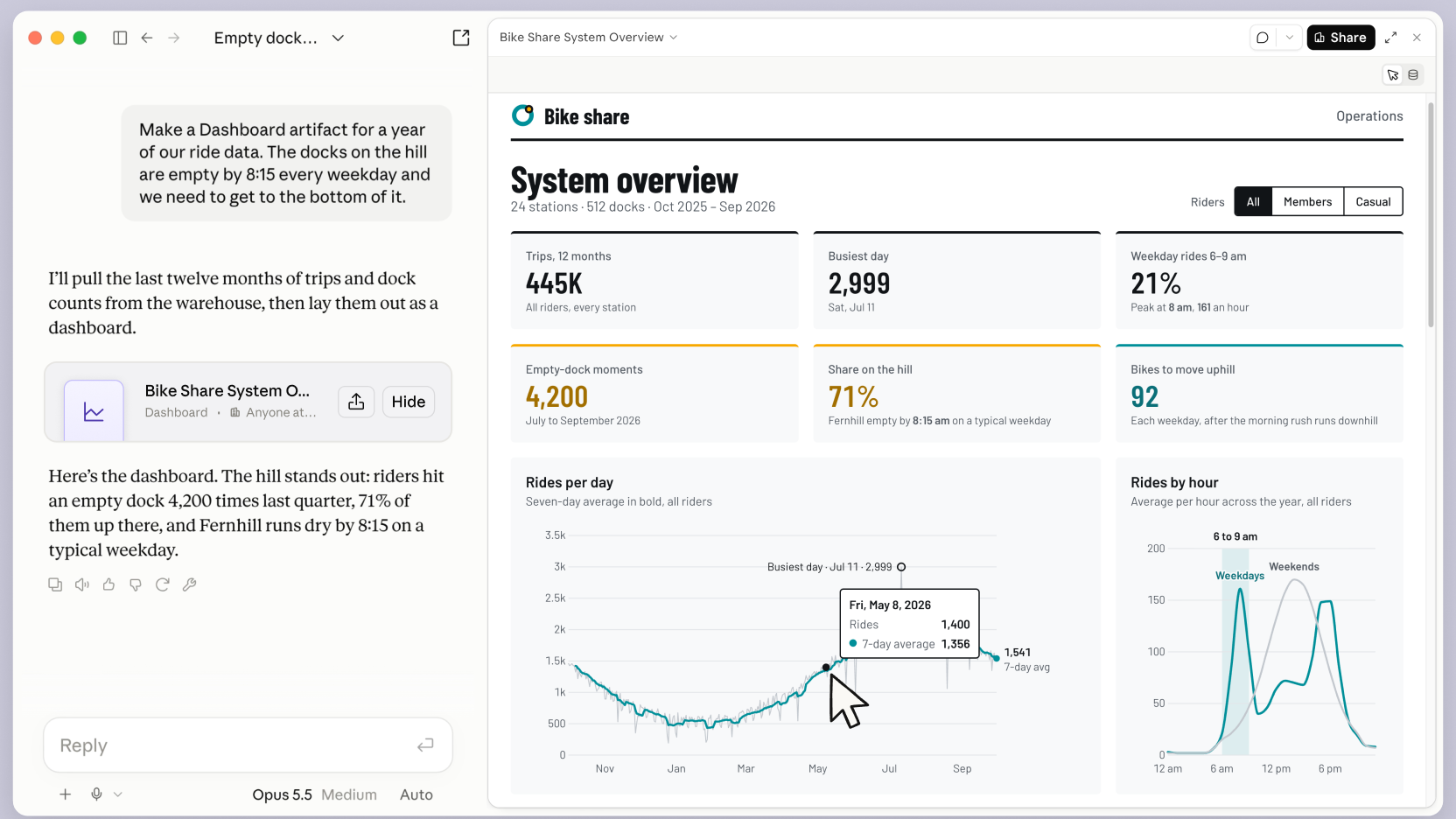
Done. 3 customers owe $8,450. Each got a friendly reminder.
Strategic implication
When intelligence gets cheaper, ownership matters more.
Brand
Audience
Data
Distribution
Systems
These are the assets AI amplifies.
The consequence
Two companies. Same market. Different economics.
Company A
Hires a person for every new task
Headcount 0 people · cost goes up every time
Company B
Builds reusable AI workflows
Headcount 1 person · output goes up every time
One scales headcount. The other scales capability.
Your new role
You do not need to become the best prompt writer.
You need to set the direction.
GoalsWhat winning looks like
PrioritiesWhat comes first
StandardsWhat good enough means
ConstraintsWhat it must never do
Today
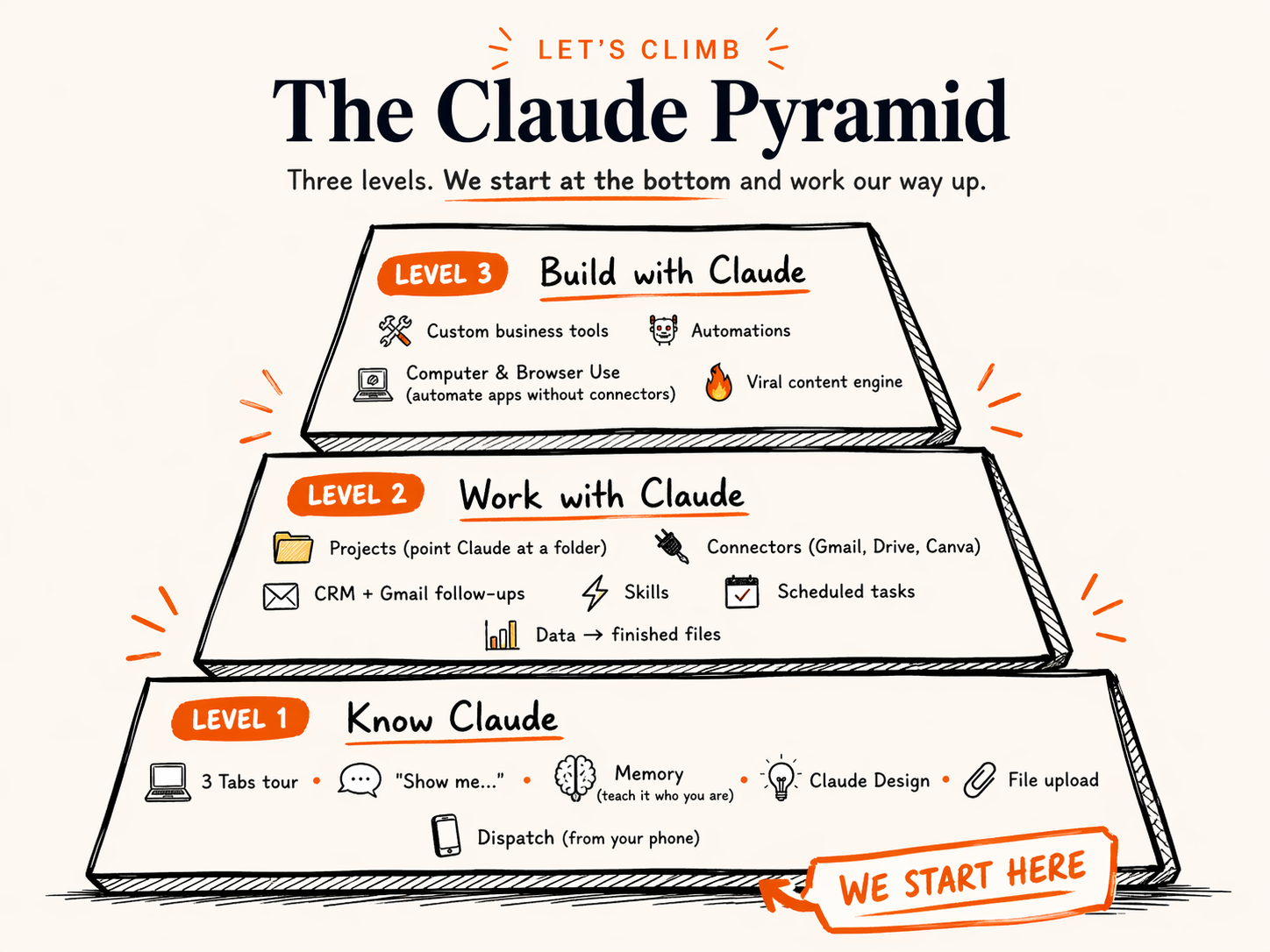
We are building your AI operating system.
1. You say what you want2. Your AI system does the work3. It comes back done
“Follow up with every new lead”
Business context
Connected agents
Reusable assets
Phone control
Emails sent
Docs written
Reports ready
Numbers tracked
You set the goal. The system handles the execution.
Now it's your turn
Introduce yourself.
Under 40 seconds
1
Your name
2
What you do
3
What you hope to learn here
Stand up. Mic up. Keep it tight.
At the end of today
Your certificate
Everyone who finishes today gets a certificate, so you can add it to LinkedIn if you want.
The certificate on the right is an example.
Example
AI
AI CEOSROCKWALL, TEXAS
CERTIFICATE OF COMPLETION
AI CEOs Workshop
This certifies that
Your Name
attended and completed the AI CEOs Workshop, a 5-hour hands-on training held on November 21, 2026 in Rockwall, Texas.
Building AI agents that run real business workflowsAutomating customer follow-up, admin and reportingHands-on implementation with Claude for business
Tony Tovar
Tony TovarLead Instructor, AI CEOs Issued by Digital Mastery, LLC
AI2026 · USA
CERTIFICATE IDAIC-RWL-0001
Real Claude use case
Claude as your personal AI video editor
Potential saving $1,000+ per month
Before · Raw take, no edits
▶ Click to play the original
After · Finished reel
▶ Click to play the result
Example workflow · Creative EXAMPLE
From one image to a moving scene.
1One image
Start with one character image: a drawing, a photo or an AI image.
→
2Claude plans the shots
SHOT 1 · 4 SEC
Wide. The dragon on a cliff at dusk, wings folding in.
SHOT 2 · 3 SEC
Close-up. One eye opens, firelight on the scales.
SHOT 3 · 3 SEC
The dragon leaps; the camera follows it into the clouds.
It writes the story, the shot list and the prompt for every shot.
→
3A video tool animates it
Paste each prompt into an image-to-video tool like OpenArt or Runway.
→
4The scene
123
Claude puts the order, timing and music notes together into a 10-second scene.
Ready for a product teaser, a story reel or a short film.
CLAUDE PLANS & WRITES → THE VIDEO TOOL ANIMATES → YOU DIRECT
Example workflow. Claude does the planning and writing; the moving images come from a separate image-to-video tool.
Example workflow · Lead capture MADE-UP BUSINESS
From website form to a ready-to-call lead.
1The form
What do you need?
Kitchen remodel
Timeline
Within 3 months
Budget
$25k – $40k
Get my free quote
A visitor to Lakeview Kitchen & Bath answers 3 questions.
→
2Claude qualifies
✓Service we offer
✓Budget fits our range
✓Ready within 90 days
LEAD SCORE
HOT LEAD
Checks the answers against your rules and scores the lead.
→
3Lands in Gmail
Gmail · Inbox
New HOT lead: kitchen remodel, $25k–$40k, within 3 months
Sarah M. · (972) 555-0148 · just now
Wants: full kitchen remodel
Timeline: start by February
Budget: $25k–$40k
✎ Reply drafted for you
A clean summary and a drafted reply, waiting for you.
→
4You call
Call Sarah todayYou spend your time on the conversation, not the paperwork.
The only step that needs you.
AI QUALIFIES ON AUTOPILOT → YOU FOLLOW UP & CLOSE
Example only: Lakeview Kitchen & Bath is a made-up business. Built with a web form, Claude and the Gmail connector.
Pair up
Remove one annoying task.
1
Team upTell each other what your business does.
2
Pick one annoying taskSomething you repeat every week.
3
Design the automation
What starts it→What AI does→Finished result
Tony picks the winner
5-minute build sprint
Turn the idea into one clear automation.
Work with your partner. Keep it simple enough to explain in one sentence.
05:00
DONE!Time to share
Before time runs out
1What starts it?
2What should AI do?
3What result appears?
Be ready to share your answer.
Ready when you are
How you work with Claude
One AI. Two ways to work.
Cowork
Do this for me
Ask, think it through, then hand over the whole task.
Answers · drafts · files · research · apps · recurring work
Claude Code
Build this for me
Create working systems that keep running.
Websites · tools · integrations · automation
Cowork = delegation |Code = construction
First exercise · Step 1 of 2
Give Claude a home for your business.
1Click Projects
2Click New project
3Name it after your business, then Create project
4Next to Instructions, click Add
5Paste the text below, then Save instructions
New
Projects
Artifacts
Scheduled
Design
Customize
More
Pinned
Recents
YYour name · Pro
What shall we think through?
How can I help you today?
Project Sonnet 5.5 Medium Manual
Projects
New project
Projects
New project
Create a project
What are you working on?
My Bakery Business
What are you trying to achieve?
Describe your project, goals, subject, etc...
Context optional
Add context
CancelCreate project
Projects / My Bakery Business
My Bakery Business
New session in My Bakery Business
Add folder
Sonnet 5.5 Medium Manual
Claude references the same knowledge every time you talk to it in this project.
InstructionsAdd
ContextAdd
MemoryView
ScheduledAdd
Private
Projects / My Bakery Business
My Bakery Business
New session in My Bakery Business
Add folder
Sonnet 5.5 Medium Manual
Claude references the same knowledge every time you talk to it in this project.
InstructionsAdd
ContextAdd
MemoryView
ScheduledAdd
Private
Set project instructions
Provide Claude with relevant instructions and information for sessions within My Bakery Business. This will work alongside your profile instructions and the selected style in a session.
Think step by step and show reasoning for complex problems. Use specific examples.You are my business assistant. Always use the AI-CEO-CONTEXT file in this project before answering. Give practical, step-by-step answers I can use today. Keep it short. If important information is missing, ask me one clear question. Never invent facts about my business.Ctrl + V
CancelSave instructions
Projects / My Bakery Business
My Bakery Business
New session in My Bakery Business
Add folder
Sonnet 5.5 Medium Manual
Claude references the same knowledge every time you talk to it in this project.
InstructionsAdd
ContextAdd
MemoryView
ScheduledAdd
Private
Instructions saved
You are my business assistant. Always use the AI-CEO-CONTEXT file in this project before answering. Give practical, step-by-step answers I can use today. Keep it short. If important information is missing, ask me one clear question. Never invent facts about my business.
First exercise · Step 2 of 2
Load your AI-CEO-CONTEXT file.
1Next to Context, click Add
2Upload from device, then Files
3Choose AI-CEO-CONTEXT.md, then Open
4Click the box New session in ... (inside the project)
5Paste the prompt below, then send
New
Projects
Artifacts
Scheduled
Design
Customize
More
Pinned
Recents
YYour name · Pro
Projects / My Bakery Business
My Bakery Business
New session in My Bakery Business
Add folder
Sonnet 5.5 Medium Manual
Claude references the same knowledge every time you talk to it in this project.
InstructionsAdd
ContextAdd
MemoryView
ScheduledAdd
Private
Projects / My Bakery Business
My Bakery Business
New session in My Bakery Business
Add folder
Sonnet 5.5 Medium Manual
Claude references the same knowledge every time you talk to it in this project.
InstructionsAdd
ContextAdd
MemoryView
ScheduledAdd
Private
Upload from device
Add text content
Your connected apps
Files
Folder
Projects / My Bakery Business
My Bakery Business
New session in My Bakery Business
Add folder
Sonnet 5.5 Medium Manual
Claude references the same knowledge every time you talk to it in this project.
InstructionsAdd
ContextAdd
MemoryView
ScheduledAdd
Private
Open
Downloads
Desktop
Documents
invoice-september.pdf
AI-CEO-CONTEXT.md
menu-photo.jpg
price-list.xlsx
CancelOpen
Projects / My Bakery Business
My Bakery Business
New session in My Bakery Business
Add folder
Sonnet 5.5 Medium Manual
Claude references the same knowledge every time you talk to it in this project.
InstructionsAdd
ContextAdd
AI-CEO-CONTEXT.mdMD
MemoryView
ScheduledAdd
Private
Projects / My Bakery Business
My Bakery Business
Read my AI-CEO-CONTEXT file. In 5 short bullet points, tell me what you understand about my business. Then suggest the 3 tasks you could take off my plate this week, starting with the one that saves the most time.Ctrl + V
Add folder
Sonnet 5.5 Medium Manual
Claude references the same knowledge every time you talk to it in this project.
InstructionsAdd
ContextAdd
AI-CEO-CONTEXT.mdMD
MemoryView
ScheduledAdd
Private
Projects / My Bakery Business / New session
Read my AI-CEO-CONTEXT file. In 5 short bullet points, tell me what you understand about my business. Then suggest the 3 tasks you could take off my plate this week, starting with the one that saves the most time.
Here is what I understand about your business:
Read my AI-CEO-CONTEXT file. In 5 short bullet points, tell me what you understand about my business. Then suggest the 3 tasks you could take off my plate this week, starting with the one that saves the most time.
No file? Open ai-ceo-context-builder.ywest.chatgpt.site (6 minutes), or type 5 lines about your business into Instructions.
5 minutes · Your business Project
Set up your Project. Load your context.
Follow steps 1-6. Ask the room for help if you get stuck.
05:00
DONE!Time to share
Before time runs out
1Project created
2AI-CEO-CONTEXT.md uploaded
3Claude listed your 3 tasks
Be ready to read your 3 tasks out loud.
Ready when you are
Before we go further · AI safety
5 habits that keep your business safe.
1. Never paste secrets. No passwords, ID or passport numbers, card or bank details, API keys.
2. Anonymise people. Use "Customer A" instead of names, phones and emails. Never paste patient or health data.
3. Check before you send. Claude can be confidently wrong. Verify numbers, prices, dates, and anything legal, tax or medical.
4. Connect only what you need. Give each connector the least access that does the job. Disconnect what you stop using.
5. You approve the actions. Read what Claude will send, delete or pay for before you click yes.
AI safety · Your questions answered
"But is it safe?"
Does Claude train on my chats? Free, Pro and Max: only if Help improve Claude is on. Turn it off in Settings → Privacy. Team and Enterprise plans are not used for training.
Can other people see my Project? No. On personal plans your chats and Projects are private to your account unless you share a link.
What can a connector do? Only what you sign in and approve. Claude asks before sensitive actions. Remove it anytime in Settings → Connectors.
Is it CCPA or HIPAA compliant? That depends on what you share. The tool doesn't make you compliant; your habits do. Anonymise customer data.
Will it make mistakes? Yes, sometimes. Treat it like a fast new employee: great first drafts, and you check the final version.
Will it replace my staff? It takes repeated tasks off their plate. People still own the customer, the judgement and the decision.
Easy trick
Ask Claude to show you.
Add these words to the end:
in an interactive way
Claude builds something you can play with. Not just text.
Only got text?Reply: "Make it interactive."Works on claude.ai and the desktop app. Not the phone app yet.
Show me how my profit changes with my priceand number of customers, in an interactive way.
Claude is building it
ClaudeDrag the sliders
Profit per month
Total profit over 12 months:
Your turn
Open Claude. Type "Show me..."
End with "in an interactive way". Then make it yours.
📈 "Show me how my profit changes when I raise my prices, in an interactive way"
🎯 "Show me my sales funnel from ad click to paying customer, in an interactive way"
🧾 "Show me where my money goes each month: rent $4k, staff $12k, ads $2k, software $500, in an interactive way"
⏱ "Show me how many hours a week I save if AI does my 3 most repeated tasks, in an interactive way"
💰 "Show me how $10,000 grows at 7% a year for 20 years, in an interactive way"
📅 "Show me a 12-week plan to launch my next product, in an interactive way"
Pick one, or write your own. You have 3 minutes. Use a laptop: visuals don't show in the phone app. Only got text? Reply "Make it interactive."
✍
Take a Few Minutes
Keep asking Claude to show you. Try different prompts.
Ask Claude to show you something about YOUR business.
5 minutes · Show me
Build one interactive visual. Then make it yours.
Use a laptop, not the phone app. Only got text? Reply “Make it interactive.”
05:00
DONE!Time to share
Before time runs out
1Ask for one visual
2Move a slider or click it
3Ask for one about your business
Show your neighbour your best visual.
Ready when you are
Still Level 1
3 More Moves to Know Claude
Quick wins that make every future chat better.
🧠
Memory
Teach it who you are
🎨
Claude Design
Create visuals in one prompt
Your turn · Memory
Teach Claude who you are.
1Click your name (bottom left)
2Click Settings
3Click Memory
4Turn on Generate memory from chats
5Paste the text below in Tell Claude what to change, then send
New
Projects
Artifacts
Scheduled
Design
Customize
More
Pinned
Recents
YYour name · Pro
What shall we think through?
How can I help you today?
Project Sonnet 5.5 Medium Manual
you@yourbusiness.com
Settings Ctrl+Shift+,
Usage
Language
Get help
View all plans
Get apps and extensions
Log out
Search
Settings
General
Account
Privacy
Billing
Usage
Capabilities
Memory
Design systems
Reflect
Time and focus
Claude Code
Claude in Chrome
Customize
Skills
Connectors
Appearance
Theme
Chat font
Transcript text size
Motion
Memory
Search and reference chatsAllow Claude to search for relevant details in past chats.
Generate memory from chatsAllow Claude to generate memory from your chats.
Include sensitive topics in memoryHealth conditions, religious beliefs and similar.
You
PreferencesHow you want Claude to respond
ProfileWho you are
Tell Claude what to changeRemember this about me and my business: I run [business name], a [what you do] for [your customers]. My tone is [e.g. friendly, direct, no-jargon]. My main offer is [your offer]. Save this and use it in every future chat we have.Ctrl + V
Claude updated your memory
Remember this about me and my business: I run [business name], a [what you do] for [your customers]. My tone is [e.g. friendly, direct, no-jargon]. My main offer is [your offer]. Save this and use it in every future chat we have.
Your turn · Claude Design
Build a prompt that makes Claude Design look amazing.
1Choose
2Your details
3Your prompt
What do you want to build? Tap one
Tell Claude about your business
Pick a style
Brand colors (optional)
Language
Only the first two boxes are required. The rest makes it better.
3Ask for changes in plain words: "make the photos bigger".
5 minutes · Memory + Design
Teach Claude who you are. Then design one visual.
Memory first. Claude Design is a bonus (Pro plan or higher).
05:00
DONE!Time to share
Before time runs out
1Memory is on
2Your business details saved
3Bonus: one design in Claude Design
Who got a post that sounds like them?
Ready when you are
🍴
Lunch Break
Enjoy your meal. We'll start again at 1:00.
Feel free to keep playing with Claude while you eat.
🙋
Quick Q&A
Questions about anything so far?
💬 Chat, Show, Cowork... anything unclear?
🔌 Claude connectors... need help setting one up?
🤔 How would YOU use this in your business?
Know your controls
Model, effort, permissions: all in one spot.
1Under the chat box, click Sonnet 5.5 Medium
2Pick a model for the job
3Effort: how hard Claude thinks
4Click Manual: the permission mode
5In Claude Code you get 4 permission modes
New
Projects
Artifacts
Scheduled
Design
Customize
More
Pinned
Recents
YYour name · Pro
What shall we think through?
How can I help you today?
Project Sonnet 5.5 MediumManual
Hardest jobs. Uses the most.Fable 5.1For your toughest challenges
Complex, many steps.Opus 5.5For complex work and everyday tasks
Start here for everyday work.Sonnet 5.5Most efficient for simpler tasks
Quick, simple answers.Haiku 5.5Fastest for quick answers
EffortMedium
More models
Higher effort means more thorough responses, but takes longer and uses your limits faster.
Quick fixes and simple questions.Low
Most work. Start here.Medium Recommended
Plans, analysis, tricky writing.High
Big jobs with many steps.Extra
Hardest problems only. Uses 5× more.Max 5× or more usage
Permission mode
New tasks, money, customers. Safest.ManualClaude asks before using new tools or opening new sites.
Tasks that already work well.AutoClaude runs on its own and pauses to ask if anything looks unsafe.
Claude Code · New session
Describe what to build...
DefaultRepoAutoOpus 5.5 High
Permissions · this session
Makes a plan first. Changes nothing until you say yes.PlanCreate a plan before making changes
Edits files without asking. Use when you trust the plan.Accept editsAutomatically accept all file edits
Claude decides when to ask. Everyday building.AutoClaude handles permission decisions
Never asks. Experts only, on a test project.Bypass permissionsNever asks (Claude Code on your computer)
Which Claude for which job?
Speed, cost and performance.
Start here
Sonnet 5.5
The car · everyday
Emails, summaries, documents, slides and spreadsheets.
Speed
Cost
Performance
Opus 5.5
The van · complex work
Analysis, automation, building tools. Jobs with many steps.
Speed
Cost
Performance
Fable 5.1
The crane · biggest jobs
Hard thinking and long projects with many stages.
Speed
Cost
Performance
Not sure? Start with Sonnet 5.5. Too hard for it? Move up to Opus 5.5.
Speed from Anthropic's model guide (fast, moderate, slower). Cost dots follow Anthropic's published prices: about 1x, 2x and 5x. Performance: Fable 5.1 is Anthropic's model for the hardest work, Opus 5.5 matches it on most work, and Sonnet 5.5 comes close to Opus on many tests. Models overview ↗
Effort
How hard should Claude think?
Low
Thinking
Uses your limit
Quick replies, fixing a sentence, simple questions.
MediumRecommended
Thinking
Uses your limit
Most work: emails, posts, documents, summaries.
High
Thinking
Uses your limit
Plans, analysis, tricky writing, numbers.
Extra
Thinking
Uses your limit
Big tasks with many steps.
Max5×+ usage
Thinking
Uses your limit
Only the hardest problems. Uses 5× or more.
Start on Medium. Go higher only when the answer is not good enough.
Permissions
How much should Claude ask you first?
Asks you a lotNever asks
Claude Code
Plan
Makes a plan first. Changes nothing until you say yes.
Use it forBig changes. When you are learning.
Cowork (chat)
Manual
Asks before using new tools or opening new sites.
Use it forNew tasks, your accounts, money, customers.
Claude Code
Accept edits
Edits files without asking. Still checks with you on other things.
Use it forYou trust the plan and want speed.
Cowork + Code
Auto
Runs on its own. Pauses to ask if anything looks unsafe.
Use it forTasks you have done before. Research.
Claude Code
Bypass permissions
Never asks. Does everything.
Use it forExperts only, on a test project. Never with real customer data.
Today: keep Manual. Switch to Auto once a task works well.
Usage limits
Two fuel tanks. Both need fuel.
5-hour session
Refills 5 hours after you starte.g. start 8pm, refills 1am
This week
Refills on your own dayExample: Thursday 10pm. Yours may differ.
What burns fuel fastest
Max effortFable modelVery long chatsBig filesClaude Code
Make it last
New chat for each new topicSonnet + Medium for everyday workHaiku for quick answers
Check your reset times: your name (bottom left) › Usage
Current sessionResets at 1:00 AM37% used
This weekResets Thursday 10:00 PM35% used
Connectors
Connect Claude to the apps you already use.
It reads and acts in your real tools, not just chat.
Claude
Gmail
C
Canva
Google Calendar
N
Notion
Google Drive
HubSpot
Microsoft 365
Slack
Watch first · Connect Gmail
Connect an app in 6 clicks.
1Click your name (bottom left)
2Click Settings
3Click Connectors
4Click Discover
5Click + on Gmail
6Sign in, then click Allow
7Done. Gmail is in Yours ✓
New
Projects
Artifacts
Scheduled
Design
Customize
More
Pinned
Recents
YYour name · Pro
What shall we think through?
How can I help you today?
Project Sonnet 5.5 Medium Manual
you@yourbusiness.com
Settings Ctrl+Shift+,
Usage
Language
Get help
View all plans
Get apps and extensions
Log out
Search
Settings
General
Account
Privacy
Billing
Usage
Capabilities
Memory
Design systems
Reflect
Time and focus
Claude Code
Claude in Chrome
Customize
Skills
Connectors
Plugins
Appearance
Theme
Chat font
Transcript text size
Motion
Connectors
YoursDiscover
SearchAdd
ConnectorTypeStatus
Your connected apps show up here.
Top connectors 6348Show all →
Google Drive Search, read, and upload files instantlyby Google
Gmail Draft replies, summarize threads, & search your inboxby Google
Google Calendar Manage your schedule and coordinate meetings effortlesslyby Google
C
Canva Search, create, autofill, and export Canva designsby Canva
Microsoft 365 Access your company's SharePoint, OneDrive, Outlook, and Teams directly...by Anthropic
N
Notion Connect your Notion workspace to search, update, and power workflows...by Notion
ConnectorTypeStatus
GmailWeb
Sign in
Allow Claude to access your Gmail
you@yourbusiness.com
Read and search your emails
Write draft replies
CancelAllow
Gmail connected
Once it is connected
Now just ask.
GmailSort my inbox
Summarize my unread emails from the last 2 days. Flag anything that needs a reply today, and draft short replies for the top 3.
Google CalendarFind free time
Look at my Google Calendar for next week. Find three free 1-hour slots for a client call, mornings if possible.
Google DriveFind a file
Find my latest price list in Google Drive and sum it up in 5 short bullet points I can send to a customer.
C
CanvaMake a post
Use Canva to make an Instagram post for my business [name] about [your promo]. Clean, modern, bold text.
N
NotionPull my tasks
Search my Notion for meeting notes from this month. List every task, who owns it, and the due date.
HubSpotChase old deals
Show my HubSpot deals with no contact in the last 14 days. Draft a short, friendly follow-up for each one.
Stay safe
You stay in control.
Claude asks first
Before it sends, posts or deletes, it asks you.
Send this email to Paige?
DenyAllow
Remove it anytime
Settings › Connectors › Yours. One app, gone.
GmailRemoved
Start with reading
Ask it to find and sum up first. Send and post later.
Find, sum up, draft Today
Send, post, delete Later
Today: keep permission on Manual.
5 minutes · Connectors
Connect one app. Let Claude use it.
Click +, then Allow. Then paste a prompt from the cards.
05:00
DONE!Time to share
Before time runs out
1App connected
2Prompt pasted
3Result landed
Show your neighbour what Claude did.
Ready when you are
Cowork power moves
8 jobs Claude can finish for you.
01Crowd favouriteSales boardFrom your customer listsales-pipeline.html
02Sales dashboardFrom any spreadsheetsales-dashboard.html
03Invoice sheetFrom a pile of invoicesinvoices.xlsx
04WebsiteFrom a short briefsweet-mango-cafe.html
05Price quoteFrom one sentencequote.pdf
06Review reportFrom your reviewsreview-report.html
07Staff scheduleFrom your rulesstaff-schedule.xlsx
08Clean folderFrom a messy oneDownloads, sorted
Not answers. Finished files. Watch me do each one, then you pick one.
Use case 1 of 8 · Sales
Your customer list becomes a sales board.
sales-pipeline.htmlClaude is workingDone in 2 minSample file
New lead4
$32,200
CarlosCW Property$16,800
TomRussell Law$7,200
CoryDigital Starter$6,400
NinaBloom Cafe$1,800
Contacted3
$9,400
SofiaSM Beauty$3,800
WadeWK Consulting$3,000
PaigePaige Fitness$2,600
Proposal3
$53,200$19,200
MikeReynolds Build$34,000
KevinBK Auto Parts$11,200
KaylaKay Film$8,000
Negotiating2
$10,800
WillFood Trucks$6,000
AaronBrooks Dental$4,800
Won2
$2,520$36,520
RachelSweet Treats$1,400
NatalieNatalie's Flowers$1,120
Lost1
$2,200
PaulaPaula Travel$2,200
Deal won · $34,000
Use case 2 of 8 · Numbers
Your sales file becomes a live dashboard.
sales-dashboard.htmlClaude is workingDone in 3 minSample file
Total sales
$17,440January to March
Best month
March$6,860 in sales
Still unpaid
$4,3606 customers owe you
Sales by month +33%
$5,168Jan
$5,412Feb
$6,860Mar
Sales by type
Services 39%
Marketing 32%
Design 14%
Other 15%
3 ways to grow
Repeat the March promo
Sell more monthly plans
Chase $4,360 unpaid
Use case 3 of 8 · Admin
A pile of invoices becomes one clean sheet.
invoices.xlsxClaude is workingDone in 2 minSample file
Invoices read
8/8
Typed by hand: 0
Mistakes: 0
INVOICE
Fresh Harvest$3,420
INVOICE
Kitchen Pro$4,673
INVOICE
Bright Pixel$3,530
INVOICE
Peak Coffee$1,056
INVOICE
Bayside Marine$2,940
INVOICE
Silk & Thread$2,376
INVOICE
Northstar Tech$3,420
INVOICE
Green Garden$3,390
InvoiceCompanyDateDueTotalStatus
INV-001Fresh Harvest5 Jan4 Feb$3,420Paid
INV-002Kitchen Pro12 Jan27 Jan$4,673Paid
INV-003Bright Pixel18 Jan17 Feb$3,530Unpaid
INV-004Peak Coffee22 Jan5 Feb$1,056Paid
INV-005Bayside Marine28 Jan27 Feb$2,940Unpaid
INV-006Silk & Thread3 Feb5 Mar$2,376Paid
INV-007Northstar Tech8 Feb10 Mar$3,420Unpaid
INV-008Green Garden14 Feb1 Mar$3,390Paid
8 invoices · total
$24,805
Still unpaid
$9,8903 to chase
Use case 4 of 8 · Marketing
A short brief becomes a real website.
sweet-mango-cafe.htmlClaude is workingDone in 5 minSample file
sweet-mango-cafe.html
Sweet Mango CafeMenuCateringVisitBook a table
214 Main Street · Open 7am to 9pm
Where Thai sweetness meets your morning coffee.
★★★★★ Loved by 5,000 followers
See the menu
Mango sticky rice$9
Matcha mango cake$8
Lunch set$15
Catering boxfrom $95
Sweet Mango
Where Thai sweetness meets your coffee.
Book a table
Mango sticky rice$9
Matcha mango cake$8
Works on a phone too
Use case 5 of 8 · Sales
One sentence becomes a quote to send.
quote-bloom-cafe.pdfClaude is workingDone in 2 min
YouQuote for Bloom Cafe: new logo and menu design. Give 3 options.
Price quote
Bloom Cafe Eastside
2 weeks50% to startReply YES to begin
quote-bloom-cafe.pdf Ready to send
Basic
$750
New logo
2 drafts
Files for print and web
Choose Basic
Most popular
Standard
$1,400
Logo and menu design
4 drafts
Print-ready menu
Choose Standard
Premium
$2,250
Logo, menu and social kit
Unlimited drafts
10 Instagram templates
Choose Premium
Use case 6 of 8 · Customers
Your reviews become a fix-it list.
review-report.htmlClaude is workingDone in 2 minSample file
30 reviews read
★★★★★
"Best mango sticky rice in town!"
Love
★★★★★
"Waited 25 minutes at lunch."
Fix
★★★★★
"Staff are so friendly."
Love
★★★★★
"Wi-Fi kept dropping."
Fix
+ 26 more
Customers love
Mango sticky rice14
Friendly staff9
Great for photos7
Fix first
Slow at lunch6
Wi-Fi drops4
Hard to park3
Reply ready to post"Thank you, Ann. You are right, lunch was too slow. We now have a second cashier from 12 to 1. Your next Thai tea is on us."
Use case 7 of 8 · Team
Your staff rules become next week's schedule.
staff-schedule.xlsxClaude is workingDone in 1 min
MonTueWedThuFriSatSunHours
MayaOff8 to 2Off2 to 82 to 88 to 22 to 830
Jake8 to 22 to 8Off2 to 88 to 28 to 2Off30
PriyaOff8 to 22 to 8Off2 to 82 to 88 to 230
Leo8 to 2Off2 to 88 to 2Off2 to 82 to 830
Sam2 to 8Off8 to 28 to 2Off2 to 82 to 830
Ava2 to 82 to 88 to 2Off8 to 2Off8 to 230
2+ people every shiftEveryone gets 2 days offJake is off on SundaySame hours for all: 30
Use case 8 of 8 · Admin
A messy folder becomes neat and sorted.
DownloadsClaude is workingDone in 1 minSample file
Before · Downloads
IMG_20260112_142356.jpg
asdfsdf.pdf
pls fix.docx
scan001.pdf
receipt_7eleven_2.jpg
tax stuff DO NOT DELETE.pdf
WhatsApp Image 2026-01-20.jpeg
New Document (4).docx
Receipts2 files
Target receipt $132.40.jpg
7-Eleven receipt $14.62.jpg
Contracts2 files
Shop lease 214 Main St.pdf
Barista contract draft.docx
Tax2 files
IRS EIN letter CP 575.pdf
1099-NEC summary 2025.pdf
Marketing2 files
February content calendar.docx
Matcha mango cake photo.jpeg
Your turn · Pick one
Pick one. Make it yours.
1Copy the prompt2New chat. Click + to add the file3Paste. Press Enter.
Save this. You'll use it every time you create content.
Let's Try Together
🎬 Create Your Viral Script
Step 1: Upload the PDF
Open Cowork. Attach the Scripting Frameworks PDF you just downloaded.
Step 2: Paste this prompt
Read this scripting frameworks document. I run a [describe your business in 1-2 sentences]. Pick the best framework for my business and write me a 30-second video script I can use for social media. Make it feel natural, not salesy. Include the hook, body, and call to action.
Claude will analyze all 12 frameworks and pick the best one for YOUR business.
✍
Take a Few Minutes
Wait for your script. Read it. Ask Claude to tweak the tone or make another version.
Try: "Make it more casual" or "Write a second version using the PAS framework"
5 minutes · Viral scripts
Get your script. Make it sound like you.
Ask Claude to tweak the tone, or write a second version with another framework.
05:00
DONE!Time to share
Before time runs out
1Script generated
2Tone adjusted
3Second version tried
Be ready to read your hook out loud.
Ready when you are
🙋
Open Q&A
Ask me anything about what we covered today.
⚡ "How do I use this for [my specific business]?"
💰 "What's the best use case to start with?"
🤔 "Can Claude do [something specific]?"
The Big Picture
What You Built Today
💬
Chat + Show
Interactive visuals from a simple prompt
📄
Cowork
Real files, charts, websites, newsletters
🔌
Claude Connectors
Gmail, Canva, Notion, Drive and more
🎬
Content Creation
Viral scripts from proven frameworks
One Claude subscription. No developer needed.
Before Today
❌ Used AI to ask questions
❌ Got text answers
❌ Had to do all the work yourself
❌ AI felt like a fancy Google
After Today
✔ Created real business files and tools
✔ Connected AI to your real apps
✔ Generated viral content with frameworks
✔ AI feels like a team member
Take this home
What to do on Monday.
1. Open your Project. Start every business chat inside it, so Claude already knows you.
2. Pick one repeated task. Use one of the 3 tasks Claude suggested this morning.
3. Run it with Claude every week. Same prompt, same files. Fix the prompt until the result needs almost no editing.
4. Then automate it. Connect the app it needs and schedule it, so it happens without you.
One task. Every week. That's how the time savings add up.
 COMING SOON
 COMING SOON